How to send Net 30 payment reminders in Shopify (before and after the due date)
If you sell wholesale on Net 30, Net 60 or a fixed due date, getting paid on time comes down to two things: reminding buyers before the payment is due, and knowing every morning who still owes you. This guide shows how to do both in Shopify. It covers what Shopify does on its own, where it stops, and three ways to fill the gap.
Short answer: Shopify can email a buyer when a payment is due or overdue, but it can't send a reminder before the due date, and it doesn't send you a report of unpaid orders. To get those, you either check orders by hand, build it in Shopify Flow, or use an app or an automation.
How payment terms work in Shopify
When an order has payment terms (for example a B2B company order with Net 30, or a draft order you send with a due date), the customer doesn't pay at checkout. The order stays Payment pending until it's paid. After the due date its payment status shows as Overdue.
If an order has been partly paid, Shopify tracks the amount still outstanding, which is the number your reminders should show, not the order total.
Step 1: Turn on Shopify's own payment reminders
Shopify can send buyers payment reminders for orders with payment terms. You choose when they go out: on the due date and on days after it, up to 30 days overdue, with at most 5 reminders per order. See Shopify Help, Deferred payments, for where to switch them on for your store.
This is free and worth turning on. What it doesn't do:
- No reminder before the due date. The first email arrives when the money is already due, which is when many buyers first look at the invoice.
- No report for you. You see the Overdue status order by order, but nothing tells you each morning what's overdue and what falls due this week.
- No warning when a buyer who owes you orders again.
Step 2: How to send a reminder before the due date
A short, friendly email 3 days before the due date is usually the reminder that gets an invoice paid on time. It reaches the buyer while there is still time to schedule the payment. You have three options.
Option A: Do it by hand (free, a few minutes a day)
- In Orders, filter by payment status Payment pending, and save the view (for example "Unpaid on terms").
- Each morning, sort by due date and look for orders due in the next 3 days.
- Email each buyer: order number, amount still outstanding, due date and how to pay.
This works for a handful of wholesale accounts. It breaks down once you have more than a few dozen open orders, or on the days you're busy.
Option B: Build it in Shopify Flow
Flow can run on a schedule, look up orders and send emails, so a before-due reminder is possible. In practice it is fiddly. You need to find the orders whose due date is a set number of days away, work out the outstanding amount, and avoid sending the same reminder twice. Flow's built-in "Send payment reminder" action goes to the company's main contact and follows Shopify's own reminder timing. Merchants on the Shopify Community report that pre-due reminders in Flow are hard to get right, so budget time for testing.
Option C: Use an app or an automation
- Reminder apps in the Shopify App Store add before-due reminders and overdue tracking. Plans with automatic reminders cost about $13–49 a month (October 2026).
- An n8n workflow does the same job without a monthly app fee, if you already use n8n or are happy to set it up. Our Payment Terms Reminders template checks your unpaid orders on terms every morning and emails buyers 3 days before the due date, on the day, and 7, 14 and 30 days overdue (you choose the days). It costs $29 once.
Step 3: How to see who owes you every morning
Whichever option you choose, give yourself one daily view of your receivables:
- Overdue: each order, buyer, amount outstanding and days overdue, plus the total.
- Due in the next 7 days: so you can expect the cash, or chase early.
- Reminders sent today: so you know what buyers have already received.
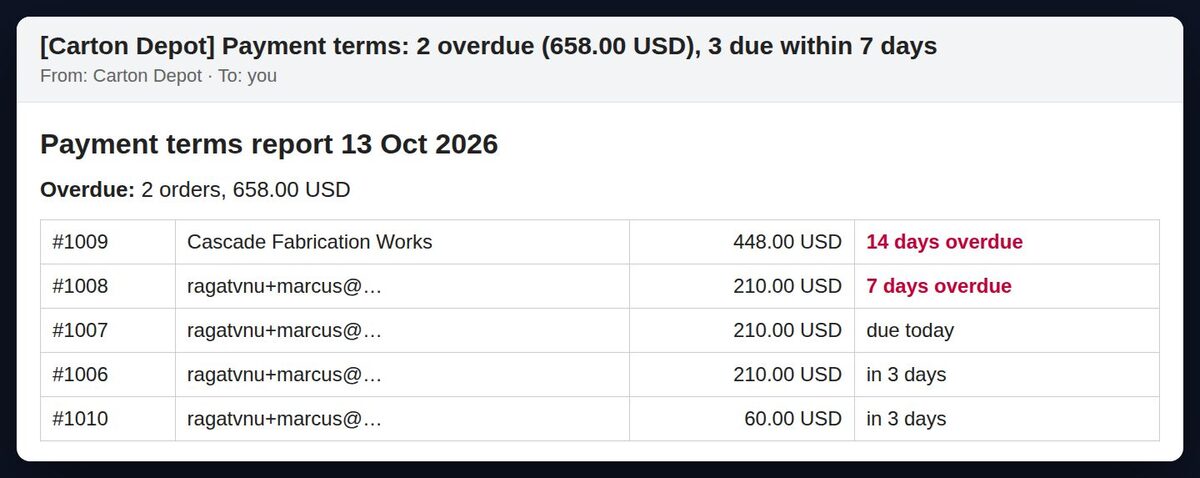
By hand, that's your saved Orders view, checked every morning. The n8n template sends it as an email (and to Slack if you want), and sends nothing on days when nothing is due or overdue.
Step 4: How to stop shipping to buyers who are overdue
When a buyer is 20 days late and places another order, you want to know before it ships. Shopify doesn't flag this on its own. Options:
- By hand: before fulfilling a B2B order, check the company's other orders for Overdue.
- Flow or an app: tag or hold new orders from customers with overdue orders.
- The n8n template's credit check: when a buyer who
owes you places a new order, you get an alert listing what's overdue,
and the order is tagged
credit-holdso nobody ships it by mistake.
Avoid double reminders
If you keep Shopify's own overdue reminders on and add another tool, buyers can get two emails on the same day. Pick one source for each stage. A simple split: Shopify handles the due-date and overdue emails, and the other tool handles only the before-due reminder and your daily report.
What a good payment reminder says
- The order number and the amount still outstanding (not the original total, if they paid part of it)
- The due date, or how many days overdue it is
- How to pay: bank details, a payment link, or "reply to this email"
- A reply-to address that a person actually reads, such as your accounts mailbox
- A polite tone before the due date, and firmer wording only after 14 days or so
FAQ
Can Shopify send a payment reminder before the due date? Not with its built-in payment reminders. They start on the due date. For a before-due reminder you need Flow, an app or an automation.
Does Shopify have a report of overdue B2B orders? You can filter Orders by payment status to see unpaid and overdue orders, but Shopify doesn't send you a daily summary.
Do partial payments count? Yes. If an order has been partly paid, Shopify tracks the amount still outstanding, and reminders should show that amount rather than the order total.
Do I need Shopify Plus? No. B2B companies and payment terms are available on Basic, Grow and Advanced since April 2026, and the methods above work on any of these plans.
Skip the setup
The Payment Terms Reminders n8n template does steps 2 to 4 for $29 once. Or have it installed and adapted for your store.