How to get alerts for wholesale and B2B orders in Shopify (email, Slack and Sheets)
In most Shopify stores a $2,000 wholesale order lands in the same Orders list, with the same notification, as a $20 retail order. If your team needs to act fast on wholesale orders (confirm stock, check credit, call the buyer), you need a separate alert for them. This guide shows how to get one by email or Slack, using Shopify's own tools, Shopify Flow or an automation.
Short answer: Shopify's staff order notification goes out for every order, and you can't limit it to B2B or wholesale. To be alerted only for wholesale orders, use Shopify Flow (an "Order created" trigger with a condition on the company or a customer tag) or an automation such as n8n.
First, decide what counts as a wholesale order
Every method below needs a rule. The common ones:
- The order comes from a B2B company. If you use Shopify's native B2B (companies, locations and catalogs, on Basic, Grow and Advanced since April 2026), every order placed by a company contact is linked to that company. This is the most reliable rule.
- The customer has a tag, such as
wholesale. This is common in stores that ran wholesale before native B2B, or that use a wholesale app. - The order has a tag, added by an app or by hand.
- The order total is above a threshold, such as $500, sometimes combined with one of the rules above.
If you use more than one, an order only needs to match one of them.
Option 1: Shopify's staff order notification (every order)
Shopify can email your staff each time an order is placed. You add recipients under Settings → Notifications in the staff notifications section. It's free and instant, but:
- It fires for every order, retail and wholesale alike, so wholesale orders get lost in the noise in a busy store.
- It doesn't show the B2B company or location in the subject, so you can't filter it reliably in your mail app.
It's a fine start for a store with a few orders a day. Beyond that, you want a rule.
Option 2: How to send a wholesale order alert with Shopify Flow
Shopify Flow is free on Shopify plans and can do a basic version of this:
- In Flow, create a workflow with the trigger Order created.
- Add a condition: the order has a company (its purchasing entity is a
B2B company), or the customer's tags include
wholesale. - Add the action Send internal email to your team. Include the order name, customer, company and total in the message.
- Optional: add a Slack action if you've connected Slack to Flow.
- Turn the workflow on and place a test order as a B2B contact.
Limits to know about:
- Building a readable email (item table, company location, a link to the order) takes some work in Flow's template editor.
- Logging each wholesale order to Google Sheets or another outside tool usually needs a connector app or Flow's Send HTTP request action, and that action needs the Grow plan or higher.
Option 3: How to get wholesale order alerts with n8n
n8n is an automation tool you can self-host for free or use on n8n Cloud. It can listen for new Shopify orders, decide whether each one is wholesale, and send the alert wherever you want.
One gotcha if you build it yourself: Shopify's order webhook includes
the company's ID but not its name, and it doesn't include the customer's
tags. To show "Cascade Fabrication Works, 88 Foundry Rd" in the alert or
check for a wholesale tag, the workflow has to look the
customer and company up through Shopify's Admin API first.
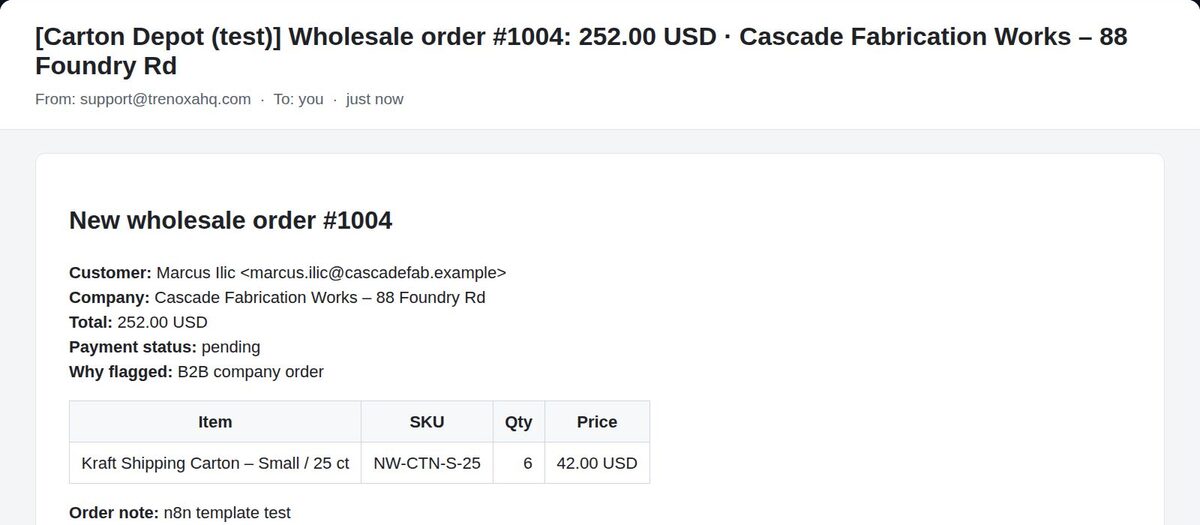
Our free Wholesale Order Alert template already handles this. It checks every new order against all four rules above (B2B company, customer tag, order tag, minimum value), ignores retail orders, and emails you who ordered, the company and location, the items, the total, the payment status and a link to the order. Setup takes about 5 minutes.
How to send wholesale orders to Slack and Google Sheets
Email works for one person. When a team handles wholesale orders, two more things help:
- A Slack message in a channel such as
#wholesale-orders, so whoever is free can pick the order up. - A Google Sheets row for each wholesale order: date, order, company, total and payment status. It gives you a running log you can sort and share without giving everyone Shopify admin access.
In Flow, Slack is an action you can add, while Sheets usually needs a connector or Send HTTP request (Grow and above). With n8n, both are standard nodes. The Wholesale Order Alert Pro template ($19) adds Slack, the Sheets log, a daily summary of yesterday's wholesale orders at 8:00, and an alert if the workflow itself fails.
What a useful wholesale order alert includes
- The order number and total in the subject line, so you can triage from your inbox
- The company and location, not just the person who ordered
- Items with SKUs and quantities, so whoever packs it can check stock
- The payment status: paid, or pending on payment terms such as Net 30
- Why it was flagged (B2B company, tag or order value), so you can trust the rule
- A direct link to the order in Shopify admin
FAQ
Can Shopify notify me only for B2B orders? Not with the built-in staff notification, which covers every order. Use Flow or an automation with a condition on the company or a tag.
Does this work without Shopify Plus? Yes. Native B2B is on Basic, Grow and Advanced since April 2026, and Flow and n8n both work on those plans. Flow's Send HTTP request action needs Grow or higher.
How do I tell a wholesale order from a retail one if I don't
use native B2B? Tag your wholesale customers (for example
wholesale) and use the customer tag as the rule, optionally
combined with a minimum order value.
How fast does the alert arrive? Flow and webhook-based automations usually run within seconds of the order being placed.
Skip the setup
The free Wholesale Order Alert n8n template sends the email alert in about 5 minutes of setup. Pro adds Slack, Google Sheets and a daily summary. Or have it installed and adapted for your store.