How to track who owes you on Shopify B2B (outstanding balances, partial payments and credit hold)
When you sell on payment terms, the hard question isn't "what did we sell?" but "who still owes us, and how much?" Shopify tracks payment on each order, but it doesn't give you an accounts receivable view per buyer. This guide shows how to see outstanding balances for your Shopify B2B buyers, how partial payments affect them, and how to stop new orders shipping to buyers who are behind.
Short answer: In Shopify, the amount owed lives on each order, not on the customer or company. To see who owes you, filter unpaid orders and group them by company, by hand or with an automation. Shopify has no built-in credit limit or credit hold, so holding orders from overdue buyers needs Flow, an app or an automation.
Where Shopify keeps the money owed
- On each order. An order with payment terms stays Payment pending until it's paid in full, and shows as Overdue after its due date.
- The amount still outstanding is stored per order.
After a partial payment, it's lower than the order total. (In the Admin
API this is the order's
totalOutstandingSetfield.) - Not on the company or customer. A B2B company's page in Shopify admin lists its orders, but there's no "balance owed" figure for the company as a whole.
So "how much does Cascade Fabrication Works owe us?" means adding up the outstanding amounts on that company's unpaid orders.
Step 1: How to see outstanding balances by buyer
By hand
- In Orders, filter by payment status (Payment pending, and also partially paid if your plan shows it) and save the view.
- Export the list to CSV.
- In a spreadsheet, group by company (or customer) and add up the amount outstanding. Sort by the oldest due date to see who is furthest behind.
This takes 10 to 20 minutes, so most stores end up doing it weekly or monthly. In the meantime, a buyer can fall a long way behind without anyone noticing.
Automatically
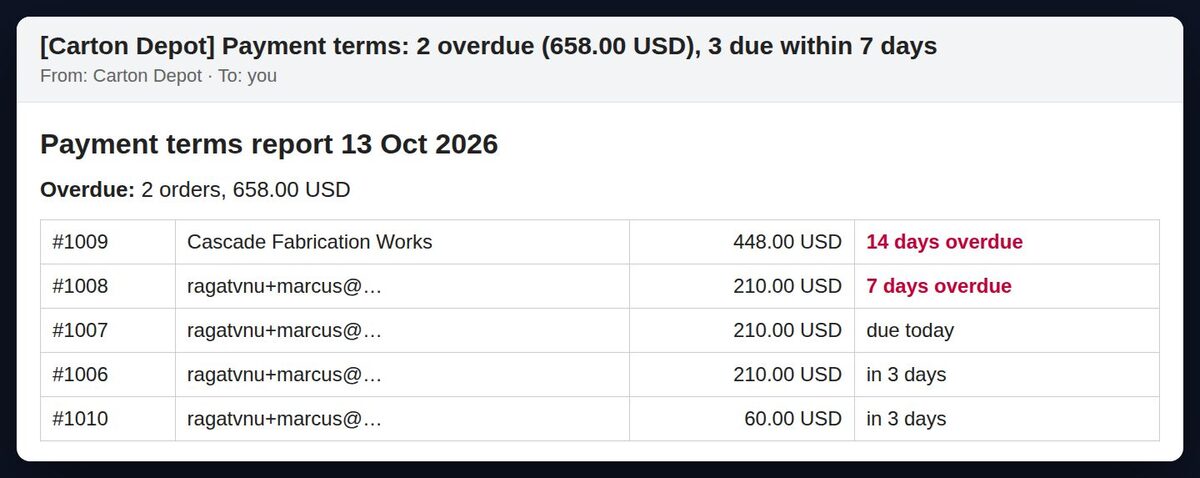
An automation can do the same thing every morning: fetch unpaid orders on terms, group them by buyer, and send you the list, with what's overdue first. That's what the daily report in our Payment Terms Reminders n8n template does.
Step 2: How partial payments change what a buyer owes
Wholesale buyers often pay part of an invoice, or pay several orders with one transfer. Two things matter:
- Record the payment on the right order. Marking a partial manual payment in Shopify admin depends on your plan (when we checked, recording part of an order as paid was a Shopify Plus feature). On other plans, many stores record the payment in their accounting tool and add a note or tag to the order.
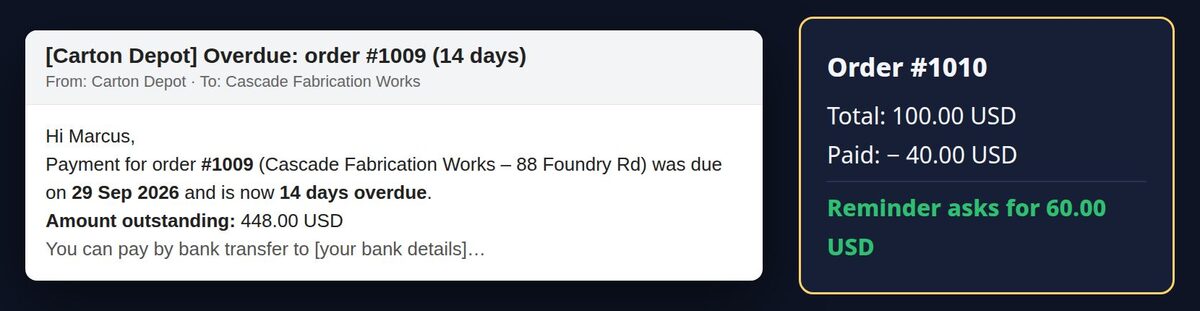
- Remind for what's left, not the total. If a buyer paid $40 of a $100 order, the next reminder should ask for $60. A reminder for the full amount is the fastest way to annoy a good customer.
Step 3: How to put a Shopify B2B buyer on credit hold
A credit hold means: this buyer is behind, so don't ship their new orders until they pay. Shopify doesn't have this built in (there's no credit limit per company), so you add it:
- By hand: before fulfilling a B2B order, open the company and check for Overdue orders. This is easy to forget when you're busy.
- With a tag: add a tag such as
credit-holdto the order, and agree with your team that tagged orders don't ship. You can filter and highlight them in the Orders list. - With Flow or an app: when an order is created, check the buyer's other orders and tag or hold the new one. Checking several past orders in Flow takes some building.
- With an automation: the Payment Terms Reminders
template includes a credit check. When a buyer who has orders overdue
places a new one, you get an email (and a Slack message if you want)
listing what's overdue, and the new order is tagged
credit-hold.
Pick a clear rule, for example "any order more than 7 days overdue", so buyers who are a day late aren't held.
Step 4: Keep buyers informed
Most late payments are forgotten invoices, not refusals. What helps:
- A reminder before the due date, so the payment gets scheduled in time (see how to send Net 30 payment reminders in Shopify)
- One clear amount in every message, with partial payments taken off
- A named contact for questions, such as your accounts mailbox
- A statement for buyers with several open orders: a list of each order, its due date and the amount outstanding. Shopify doesn't send these, so you'd send it from your accounting tool or a custom automation.
FAQ
Does Shopify have an accounts receivable report? Not a per-buyer one. You can filter and export unpaid orders, then group them by company or customer yourself, or automate it.
Can I set a credit limit for a B2B company in Shopify? Not natively. You can approximate it with a credit hold rule (tag new orders from buyers with overdue orders), using Flow, an app or an automation.
Where is the outstanding amount on a Shopify order?
On the order page in Shopify admin, and in the Admin API as
totalOutstandingSet. It goes down as payments are
recorded.
Should I sync this to my accounting software? If you already use one (QuickBooks, Xero), that's where invoices and payments should be the source of truth. The methods here are for stores that track terms in Shopify itself.
Skip the setup
The Payment Terms Reminders n8n template sends the daily who-owes-what report and runs the credit check, for $29 once. Or have it installed and adapted for your store.