Can you sell event tickets on Shopify? Classes, workshops and small events
If you're about to run your first workshop, tasting or class, and you already sell on Shopify, the obvious question is whether the same store can sell the places. It can, but not out of the box, and the right setup depends on what kind of event it is.
Short answer: Shopify has no built-in booking system or ticket type. A ticket is just a product to Shopify, so it doesn't know a date, a time or how many places are left unless you track that yourself. For a one-off event with a handful of seats, a single product with stock set to the number of places is enough. For anything you run on several dates, or where overselling would hurt, you add an app: a booking app for classes and workshops, or a ticketing app for bigger events with QR check-in.
Does Shopify have a booking system?
No. Shopify sells products and variants with stock. It has no idea of:
- a session (a date and time something happens)
- a capacity that belongs to that session rather than to a product
- a seat held during checkout, so two people can't both pay for the last place
- a guest list per date
Everything below is a way of adding those, either by hand or with an app.
Option 1: a product per event, stock as places
Create a product called "Wreath Making Night, Fri 4 Dec", set Track quantity on, and set the stock to the number of places. Shopify stops selling when the stock hits zero.
Good for: a single event, or two or three dates a season.
Watch out for:
- Stock must be set on every new date. Duplicate a product and forget the stock, and it sells without limit.
- Past events stay in your shop until you hide or archive them.
- No guest list. To see who's coming, filter orders by that product.
- Shipping. Turn off "This is a physical product" so checkout doesn't ask for a delivery address.
Option 2: one product, dates as variants
"Wreath Making Night" becomes one product, and each date is a variant with its own stock. One listing, and customers pick a date.
Good for: a few dates of the same event.
Watch out for: every new date is a new variant with stock set by hand, a product can have only so many variants, and removing old dates can tidy away the history you'd want for reports. Customers also find long date dropdowns hard to read on a phone.
Option 3: a class or workshop booking app
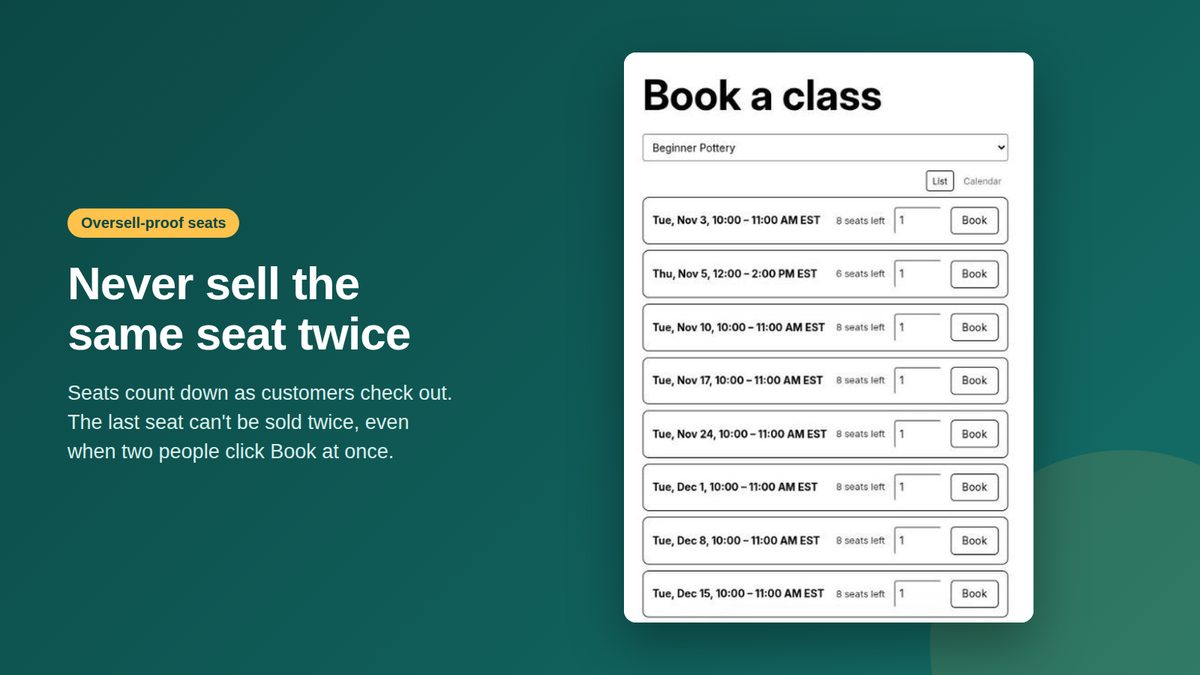
A booking app adds the missing pieces: each date is a session with its own seat count, customers pick a date on your product page or a booking page in your theme, seats count down at checkout, and a session stops selling when it's full. Most also keep a guest list per session.
Good for: classes and workshops you repeat (weekly, monthly or a run of dates before Christmas), where the people who book are your customers and might also buy materials, kits or gift cards in the same order.
Questions to ask any booking app:
- Does each session have its own seat count, and does checkout refuse a booking when it's full?
- Is a seat held while someone is paying, so the last place can't be sold twice?
- Do customers pay through your normal Shopify checkout, in your theme?
- What happens to your products and orders if you uninstall it?
Option 4: a ticketing app or Eventbrite
For concerts, conferences, festivals or anything with a door, you want what ticketing tools are built for: emailed tickets with QR codes, scanning at the entrance, reserved seating and big audiences. That's a different job from a 10-person pottery evening.
Eventbrite is the common choice when you don't want a store at all. The trade-off for a shop owner: buyers leave your store, Eventbrite charges a fee per ticket, and those buyers end up in Eventbrite's list rather than your Shopify customers, so you can't easily sell them supplies or the next class. More on that trade-off: Eventbrite or Shopify for your workshops?
Which one fits
| You run... | Use |
|---|---|
| One event, a handful of places | A product with stock = places |
| The same workshop on a few dates | Dates as variants, or a booking app |
| Classes every week or a season of dates | A class booking app |
| Large events with door check-in | A ticketing app or Eventbrite |
Before you put the first date on sale
- Decide the capacity and keep a seat back if you want room for a friend or a walk-in.
- Say what's included and how long it takes. Materials, drinks, what people take home.
- Write your policy for no-shows, moving to another date and gift bookings.
- Test a booking on your phone, from product page to confirmation email.
- Edit the order confirmation (Settings → Notifications) so it tells people where to go and when to arrive.
How Trenoxa Bookings handles it
Trenoxa Bookings is our Shopify app for classes and workshops: each date gets its own seat limit, seats count down at your normal Shopify checkout, the last seat can't be sold twice, and past dates drop off on their own. Customers book on the class's product page or a booking page in your theme, and every session keeps a guest list. It doesn't do QR tickets or door scanning, so for big events a ticketing app is the better fit.
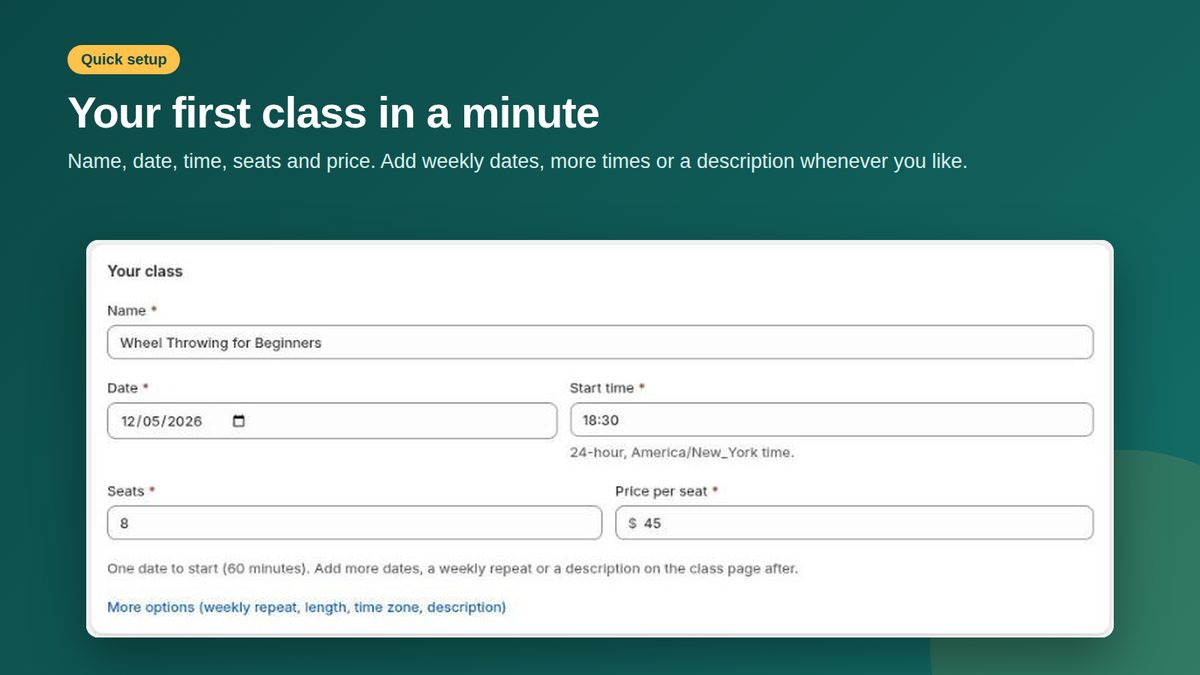
Your first class takes a minute to set up, and the Free plan covers one class. Unlimited classes are $23 a month.
Running your first workshop?
Install Trenoxa Bookings (free for one class) and your first class takes a minute. Or send us the dates and we set it up for you, free.
By class type: pottery · painting · cooking · craft workshops. Comparing apps? See what each booking app would cost for your classes.
More guides on this topic
- Workshop calendar 2027: dates and class ideas for every month
- How to run and sell a Christmas wreath workshop on Shopify
- Demo: a Christmas wreath workshop set up in Trenoxa Bookings
- Eventbrite or Shopify for your workshops?
- ClassBento vs Eventbrite vs your own Shopify store for classes (2026)
- From a paper sign-up sheet to online class bookings: what changes
- Best Shopify booking apps for classes and workshops (2026)
- How to sell classes and workshops on Shopify without overbooking