Does Shopify have a booking system? Which kind of booking app you need
If you sell on Shopify and want customers to book something, a class, an appointment, a place at an event or a rental, the first question is whether Shopify can do it on its own.
Short answer: no. Shopify has no built-in booking system. It sells products and variants with stock, and it doesn't know about dates, times, seats per session or opening hours. You can fake a simple booking with a product and its stock, and for anything more you add a booking app. Which app depends on what kind of booking you take, and that's where most store owners pick the wrong one.
What Shopify does have
- Products and variants, so "Wreath Night, Fri 4 Dec" can be a product, or a date can be a variant.
- Stock per variant, so a product stops selling when the stock hits zero.
- Checkout, payments, refunds and order emails, which every booking app below reuses.
What it doesn't have: a calendar, a time slot, a seat that belongs to one date, a hold while someone is paying, staff availability or a guest list per session. Booking apps add those.
Which kind of booking do you take?
Booking apps are built for one of four jobs. Choose the job first, then the app.
| You take bookings for... | What it needs | Kind of app |
|---|---|---|
| Appointments: haircuts, massages, consultations, repairs | Open slots worked out from opening hours, length of each service, staff, buffers between bookings | An appointment app |
| Classes and workshops: pottery, cooking, knitting, floristry | Dates you set, a seat limit per date, multi-week courses, a guest list | A class booking app |
| Events: concerts, conferences, big parties | Tickets, QR codes, scanning at the door, sometimes reserved seats | A ticketing app or Eventbrite |
| Rentals: equipment, rooms, holiday stays | Date ranges, return dates, deposits | A rental app |
A salon app on a pottery studio works badly (it thinks in staff and slots, not seats), and a class app can't run a busy salon. Most bad booking-app reviews come from that mismatch.
The free way: a product per date
Before any app, you can sell a few dates with what Shopify already has:
- Create a product per date, for example "Candle Making, Sat 12 Dec, 2 pm".
- Turn on Track quantity and set the stock to the number of places.
- Untick This is a physical product so checkout doesn't ask for a delivery address.
Shopify stops selling when the places run out. This works for one or two dates. It breaks when you repeat things: every new date needs the stock set by hand, past dates stay in your shop until you hide them, two people can both pay for the last place in the same minute, and there's no list of who's coming apart from filtering orders.
More on this route and its limits: Can you sell event tickets on Shopify?
What to check in any booking app
- Does each date have its own limit, and does checkout refuse a booking when it's full?
- Is a place held while someone pays, so the last one can't be sold twice?
- Do customers pay in your normal Shopify checkout, with your theme, discounts and gift cards?
- Do past dates disappear on their own?
- What's the real monthly cost for the number of classes or staff you have? Our booking app cost calculator works it out for class apps.
- What happens to your products and orders if you uninstall?
Appointments: when Trenoxa Bookings fits and when it doesn't
Our app, Trenoxa Bookings, is a class and workshop app, not a salon app. It has no staff calendars or opening hours, so if clients pick any free time with one of several staff members, use an appointment app.
It does fit one-person appointments at fixed times, such as private music lessons, a 1:1 sewing tutorial or a consultation. Create the times you're available as sessions with one seat each. Each slot sells once and then disappears from the booking page.
Classes and workshops: Trenoxa Bookings
Trenoxa Bookings gives each class date its own seat limit. Seats count down at your normal Shopify checkout, the last seat can't be sold twice, and past dates drop off on their own. It also handles:
- courses over several weeks sold as one booking that holds the same seat on every date
- a calendar of all your classes on your store
- private group requests, which block the studio for public classes at the same time
- a guest list per session, with a CSV download
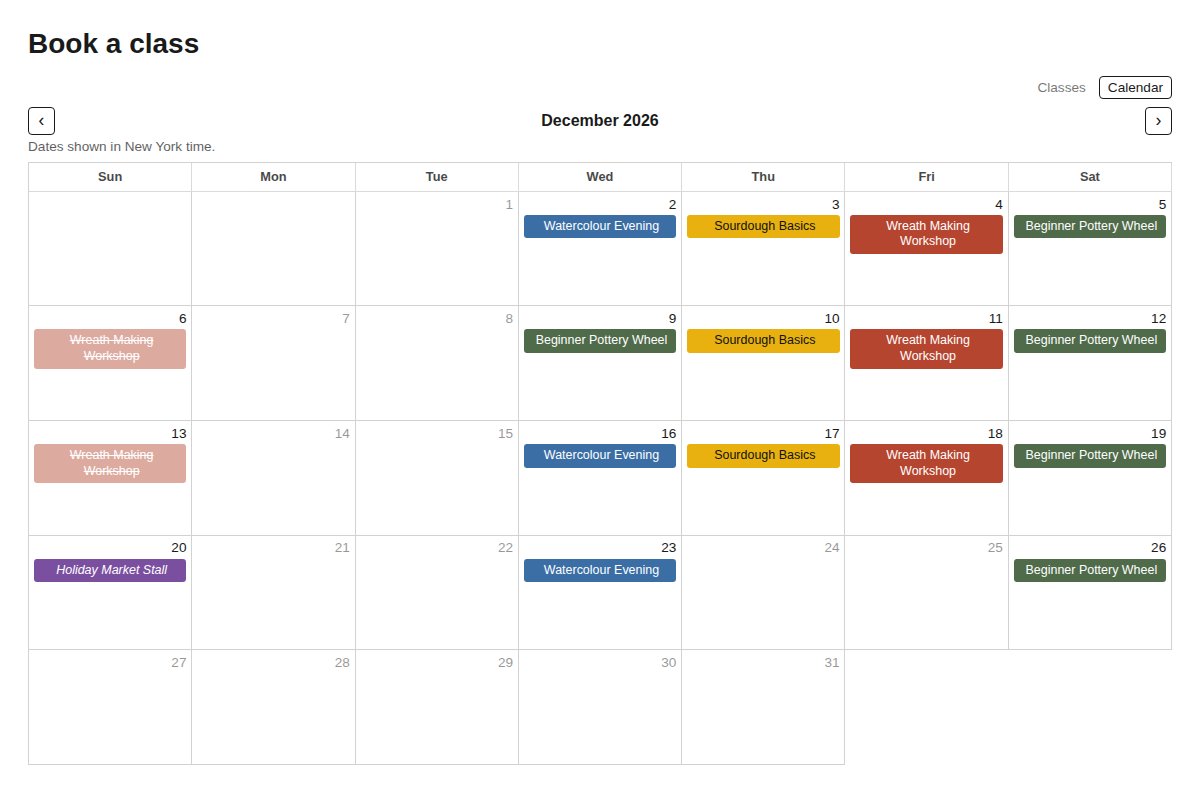
The Free plan covers one class, and unlimited classes are $23 a month. If you're comparing apps, read Shopify class booking apps compared.
Taking bookings for classes or workshops?
Install Trenoxa Bookings (free for one class) and your first class takes a minute. Or send us your dates and we set it up for you, free.
By class type: pottery · painting · cooking · craft workshops. Comparing apps? See what each booking app would cost for your classes.
More guides on this topic
- Workshop calendar 2027: dates and class ideas for every month
- How to run and sell a Christmas wreath workshop on Shopify
- Demo: a Christmas wreath workshop set up in Trenoxa Bookings
- Eventbrite or Shopify for your workshops?
- How to sell mahjong lessons on Shopify (and what to charge)
- How to sell needlepoint classes on Shopify (and what to charge)
- How to email your class students on Shopify: date notes and new-class announcements
- ClassBento vs Eventbrite vs your own Shopify store for classes (2026)
- From a paper sign-up sheet to online class bookings: what changes
- Best Shopify booking apps for classes and workshops (2026)
- Shopify events calendar and event registration: paid and free events
- Can you sell event tickets on Shopify? Classes, workshops and small events
- How to sell classes and workshops on Shopify without overbooking