Shopify events calendar and event registration: paid and free events
If you run events from a Shopify store, such as workshops, tastings, a launch night or a New Year's Eve party, you probably want two things: a calendar on your store that shows what's coming up, and a way for people to register, paid or free.
Short answer: Shopify has neither. There's no events calendar and no registration form built in. You can build a simple events page by hand, sell paid places as products, and add an app when you want a real calendar, place limits and a list of who's coming.
Option 1: an events page you edit by hand
Create a page (Online Store → Pages) called "Events" and list each event with its date, time, place and a link: to a product for paid events, or to a contact form for free ones.
Good for: two or three events a season.
Watch out for: you update it by hand. Past events stay up until you remove them, sold-out events still look open, and nothing tells visitors how many places are left.
Option 2: paid places as products
For paid events, make each event a product with Track quantity on and the stock set to the number of places. Untick This is a physical product, so checkout doesn't ask for a delivery address. Shopify stops selling when stock reaches zero, and the order is your registration.
Watch out for: every date needs its stock set by hand, and two people can both pay for the last place at the same moment. The orders list is your only guest list. Details: Can you sell event tickets on Shopify?
Free events and RSVPs
A free event is harder, because Shopify's only sign-up path is checkout:
- A $0 product works, but every guest goes through checkout and fills in a full order form, which feels heavy for an open evening.
- A contact form collects names, but it has no place limit, so a popular free event fills twice over and you sort it out by email.
- An app with a sign-up form asks only for name, email and number of people, and stops at the limit you set.
What a good events calendar shows
- Every upcoming event in one place: as a month calendar on desktop and a list on a phone.
- Places left, and sold out or full when there are none.
- No past events: they drop off on their own.
- One click to book or sign up, with paid places going to your normal checkout.
- Events you already keep elsewhere, for example a Google Calendar, without typing them twice.
Example: a New Year's Eve workshop night with 20 places
- Decide the format. A 2-hour wreath or candle workshop on 31 December at 7 pm, 20 places, materials and a drink included.
- Create it as a session with 20 seats, or as a product with stock 20 if you're not using an app.
- Put it on your events calendar with a photo, the time and what's included.
- Add a free event alongside it if you like, such as an open-house afternoon, with a sign-up limit of 40.
- Edit the order confirmation email (Settings → Notifications) so it says when to arrive and what to bring.
- Test both on your phone: a paid booking through checkout and a free sign-up.
How Trenoxa Bookings handles it
Trenoxa Bookings is our Shopify app for classes, workshops and events:
- Calendar of everything: all your classes and events on one calendar in your theme, or as a list. You choose list, calendar or both.
- Paid places with seat limits: each date has its own limit, seats count down at your normal Shopify checkout, the last seat can't be sold twice, and past dates disappear.
- Free events with sign-up: a short form (name, email, number of people) with a place limit. You get the list and a CSV download.
- Events from Google Calendar: paste your calendar's iCal address and events are imported and kept in sync every 3 hours. An event can also simply link to a product or page.
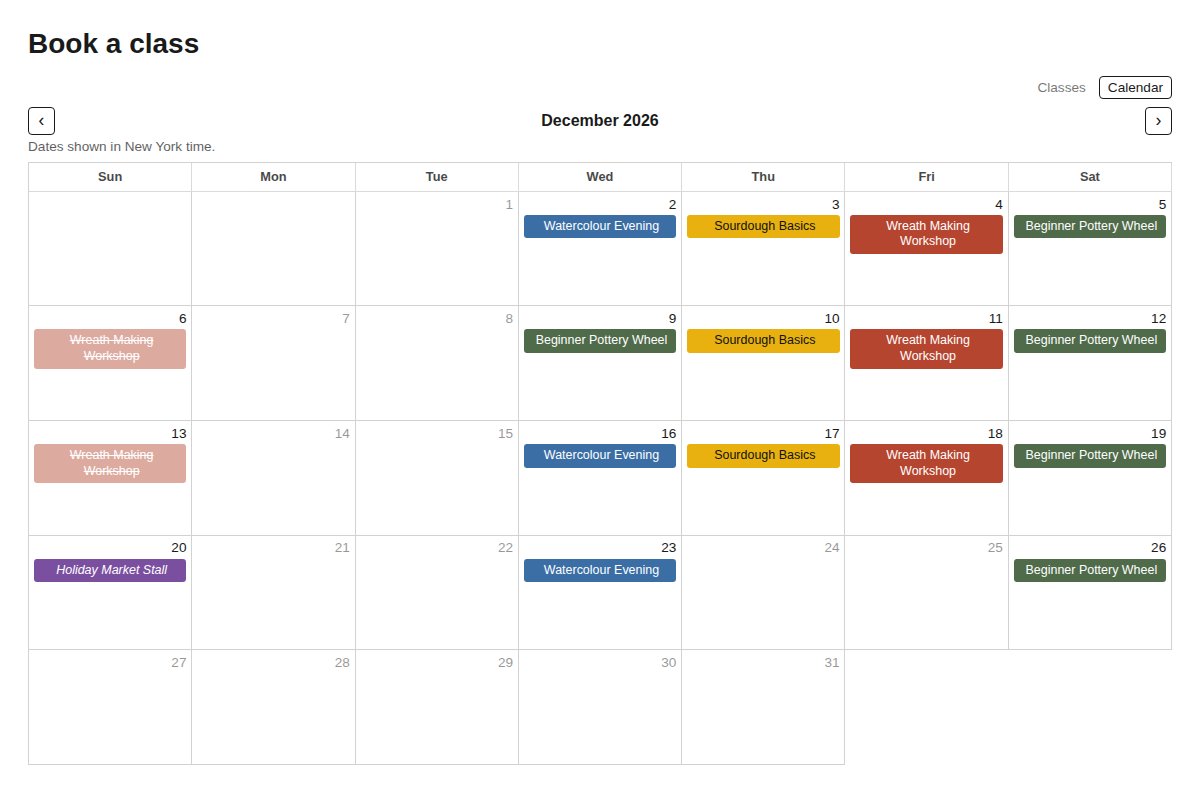
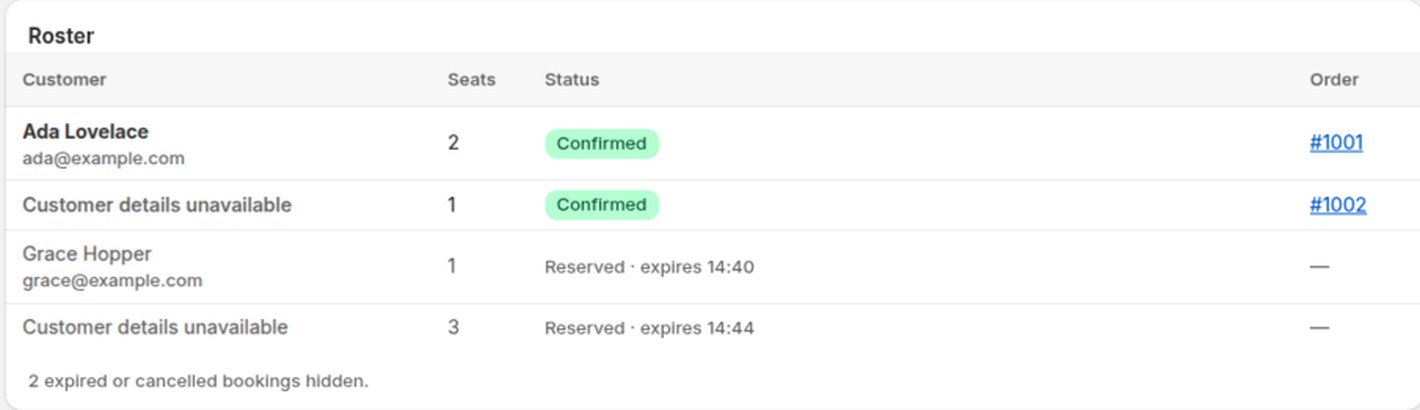
It doesn't do QR tickets or door scanning, so for concerts or conferences a ticketing app fits better. The calendar appears once you have two or more classes, so it comes with the Standard plan: unlimited classes and events for $23 a month. The Free plan covers one class.
Not sure which kind of booking app you need? Read Does Shopify have a booking system?
Running events from your store?
Install Trenoxa Bookings for a calendar, seat limits and free sign-ups. Or send us your event dates and we set them up for you, free.
By class type: pottery · painting · cooking · craft workshops. Comparing apps? See what each booking app would cost for your classes.
More guides on this topic
- Workshop calendar 2027: dates and class ideas for every month
- How to run and sell a Christmas wreath workshop on Shopify
- Demo: a Christmas wreath workshop set up in Trenoxa Bookings
- Eventbrite or Shopify for your workshops?
- How to sell mahjong lessons on Shopify (and what to charge)
- How to sell needlepoint classes on Shopify (and what to charge)
- How to email your class students on Shopify: date notes and new-class announcements
- ClassBento vs Eventbrite vs your own Shopify store for classes (2026)
- From a paper sign-up sheet to online class bookings: what changes
- Best Shopify booking apps for classes and workshops (2026)
- Does Shopify have a booking system? Which kind of booking app you need
- Can you sell event tickets on Shopify? Classes, workshops and small events
- How to sell classes and workshops on Shopify without overbooking